Apple's hardware has earned a reputation for being polished, deliberate, and occasionally stubborn. The product concepts collected below are not rumors or leaks. They are speculative wishlists — ideas pitched by readers who imagine a more flexible, more tactile, more literate version of the devices they already love. We have grouped them into a single essay to make the recurring themes easier to spot: reversal, dual-orientation software, physical keys with dynamic labels, and a more thoughtful reading surface.
"Hardware should adapt to the way you sit, read, type, and travel — not the other way around." — From a reader submission
Six Speculative Apple Product Concepts Back to top
Based on the independent commentary site applefuturewatch.com, the authors present six speculative Apple product concepts envisioned by readers. The six concepts are summarized below.
1. A Reversible iPhone
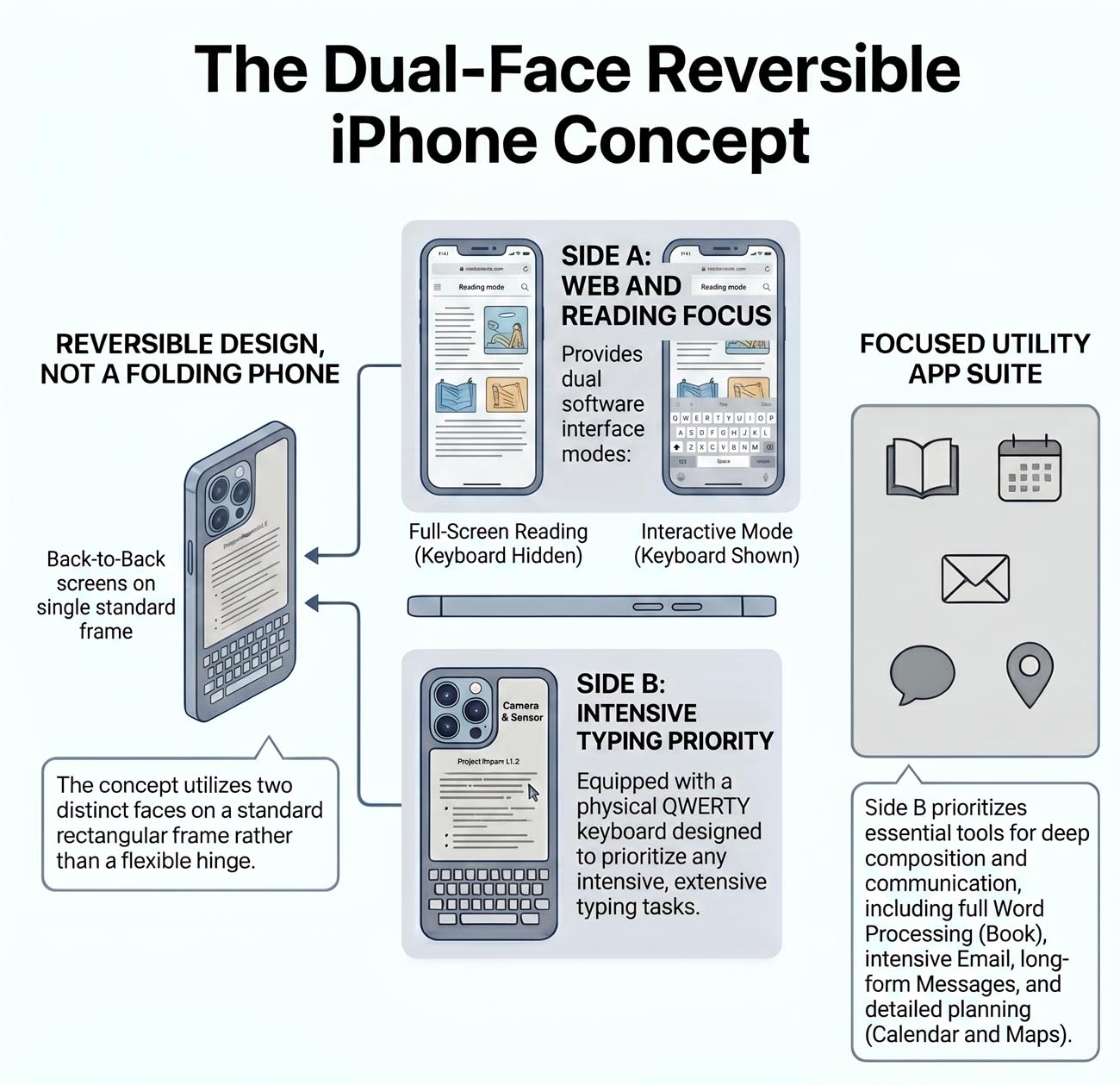
- Dual-Faceted Design: A regular iPhone interface on the front face (full-color OLED, full app library).
- Minimalist Back Face: An E-Ink display and a physical keyboard on the reverse side for distraction-free reading and writing.
2. An iPad Pro with OS-Switching
- Context-Aware OS: Runs iPadOS natively as a pure tablet, but unlocks the ability to run macOS when attached to a Magic Keyboard.
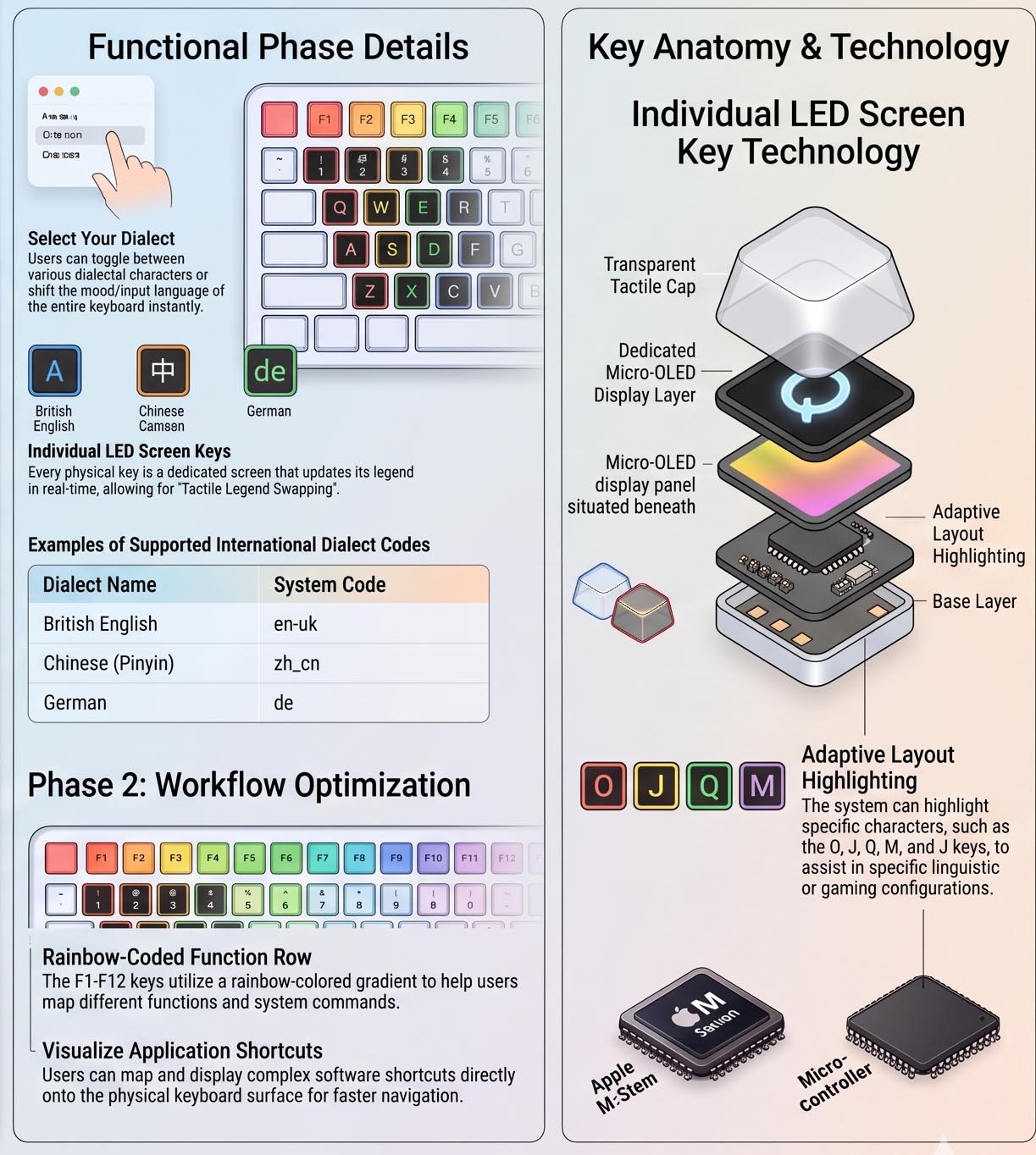
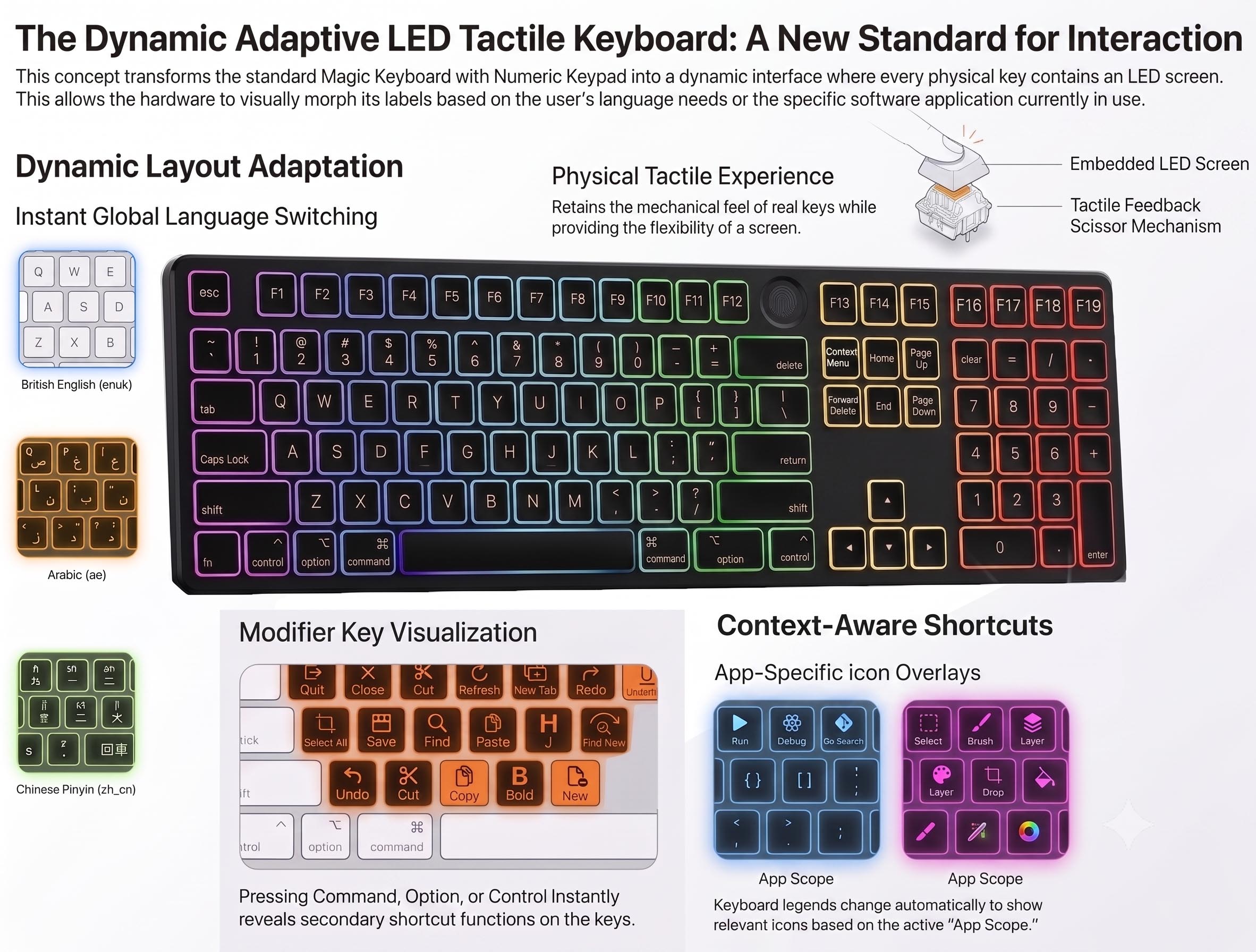
- Dynamic Magic Keyboard: A redesigned, protective keyboard that supports both portrait and landscape orientation, featuring dynamic physical keys with tiny LED screens to change languages and context-aware shortcuts on the fly.
3. An Ecosystem-Integrated E-Ink Tablet
- Reading-First Screen: Built specifically to eliminate glare, eye fatigue, and the battery drain of typical bright iPad screens.
- Seamless iCloud Sync: Solves the workflow gap of third-party e-readers by natively syncing notes, highlights, and handwriting with the core Apple ecosystem.
4. A Reversible MacBook Air
- 360° Form Factor: Features a hinge that allows the keyboard to fold completely back to turn the laptop into a tablet.
- Dual-Operating Systems: Boots into macOS when used as a standard laptop, but automatically switches to iPadOS and enables touchscreen capabilities when folded into tablet mode.
- Dynamic Keys: Outfitted with LED-display physical keys. Note that this specific dual-OS design is explicitly pitched for the Air line and omitted from the Pro line.
5. A MacBook Pro with LED-Display Keys
- Standard Pro Chassis: Retains the traditional form factor and premium typing feel that power users rely on.
- Dynamic Key Surfaces: Replaces static keycap legends with tiny LED screens to adapt instantly to localized language layouts and display app-specific shortcut hints based on held modifier keys.
6. A Full-Function Numeric Keypad
- Muscle-Memory Protection: A standalone companion keypad designed to bridge the gap when switching between a desktop setup and a portable MacBook.
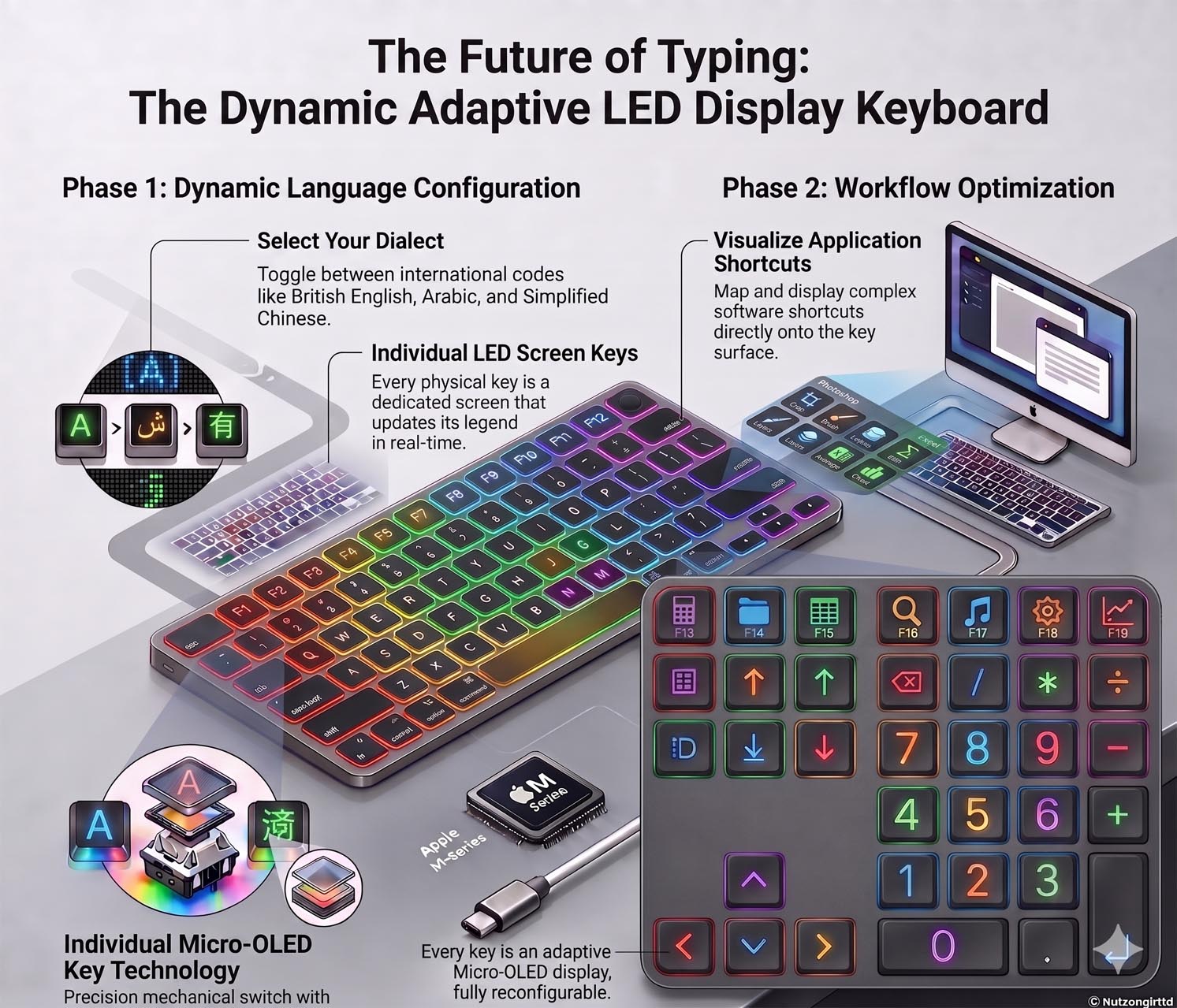
- Layout Extensions: Houses full navigation keys (Home, End, Page Up/Down, Arrows), an extended function row (F13–F19), and true systemic modifier keys (Command, Option, etc.) that sync perfectly with the primary keyboard's state.
Back to top
A Reversible iPhone
Two faces, two personalities — a full smartphone on one side, a focused Minimal Phone on the other.
The idea is simple but ambitious: a single handset that flips between two distinct experiences. On the front, it behaves like the iPhone you already know. On the back, it becomes something quieter, lighter, and more deliberate.
- Front faceA regular iPhone — full-color OLED, full app library, full connectivity.
- Back faceA Minimal Phone: a physical keyboard and an E-Ink display for reading, writing, and distraction-free work.
The result is a device that can be a media machine in the morning and a focused writing tool in the evening — without juggling a second device.
An iPad Pro That Knows What It's Wearing
Smart enough to switch operating systems depending on whether a Magic Keyboard is attached.
The iPad Pro is already the most versatile computer Apple sells. The next step is letting it change roles — and operating systems — based on context.
- UnattachedRuns iPadOS as a pure tablet.
- Attached to a Magic KeyboardCan run either iPadOS or macOS, chosen by the user.
- A redesigned Magic Keyboard for iPad ProWorks in both portrait and landscape orientation.
- Physical keys with LED displaysEvery key is a tiny screen, so legends can change on the fly.
With dynamic key labels, the keyboard can:
- Switch languageShow Cyrillic, Arabic, CJK, or any layout on demand.
- Offer a real typing experienceReal key travel, real feedback — no virtual compromise.
- Show context-aware shortcutsDisplay app-specific shortcuts and live modifier-key combinations directly on the key surface.
- Protect the iPad properlyA hinge and shell design that shields the sides of the iPad rather than leaving them exposed.
An E-Ink Tablet Built Into the Apple Ecosystem
A reading-first tablet that talks fluently to the rest of your Apple devices.
There is a quiet problem that iPad owners recognize: the iPad is too bright, too reflective, and too "always-on" to be a good book. So people buy a second, non-Apple e-ink tablet — and then their notes, highlights, and reading sessions live in a separate app universe.
- Reading books on iPad is unsatisfyingGlare, weight, and battery anxiety make long sessions tiring.
- Watching video on iPad, but needing another tablet for notesThe current workflow splits attention across two devices and two ecosystems.
- Reading on an e-ink tablet, but needing the iPad for notesHighlights, marginalia, and screenshots can't easily flow back into Apple's apps.
A first-party Apple e-ink tablet would close that loop: same notes app, same iCloud sync, same handwriting pipeline, on a screen that disappears when you're not looking at it.
A Reversible MacBook Air
A 360° hinge, dynamic keys, and two operating systems chosen by orientation.
The MacBook Air is the right place to try something radical. It is light, beloved, and tolerant of experimentation. The concept below imagines it as a true shape-shifter.
- Reversible keyboard that folds 360°Fold it past the screen and the laptop becomes a tablet.
- Physical keys with LED displaysEvery key is a tiny screen for dynamic legends and shortcuts.
- Open as a laptop → macOSIn normal laptop orientation, it runs macOS.
- Reversed into a tablet → iPadOSWhen folded back, the same hardware switches to iPadOS.
- Touchscreen, but only when reversedTouch input is reserved for tablet orientation, preserving the laptop trackpad experience.
Scope: this reversible, dual-OS design is reserved for the MacBook Air line — and explicitly not offered on the MacBook Pro.
A MacBook Pro With LED-Display Physical Keys
Keep the form factor, swap the legends — every key becomes a dynamic surface.
The MacBook Pro is where power users live. The argument here is conservative in shape but ambitious in surface: don't change the chassis, change the keys.
- Physical keys with LED displaysReal key travel, real key feel — with legends that can change.
- Switch language on the flyLocalized layouts without separate physical keyboards.
- Real key experienceNo compromises to the tactile typing feel professionals expect.
- Live shortcut hintsEach key displays the current shortcut based on the active app and the modifier keys currently held.
A Full-Function Numeric Keypad
A small keypad that mimics the full keyboard — so shortcuts don't break when you switch setups.
Today, moving between a desktop Mac with a full keyboard and a MacBook on the go means losing roughly a third of your muscle-memory shortcuts. The proposal: a compact numeric keypad that ships the missing keys with it.
Function row
Navigation
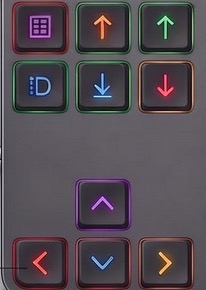
Modifier keys — shared with the main keyboard
Every modifier on the numeric keypad should be a true modifier: pressing it on the keypad must register identically to pressing the same key on the main keyboard. Nothing about the active app or modifier state should change.